

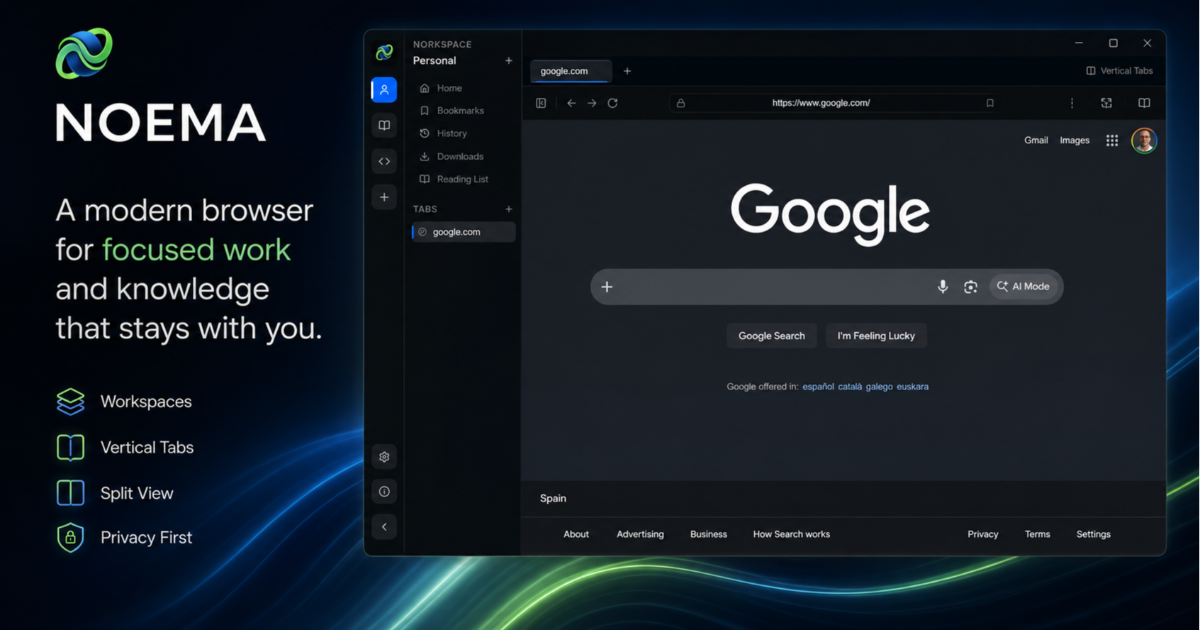
The browser may be one of the applications we use most frequently, but its basic model has changed surprisingly little. We open pages, accumulate tabs, lose track of what belongs to which task and eventually start again with another window.
NOEMA started with a simple question: what would a browser look like if it were designed not only to display websites, but also to help us organize ideas, research and everyday digital work?
Today, PRISALYA is releasing NOEMA 1.0.2, the first publicly available version of that idea.
More than another browser
NOEMA is a modern desktop browser designed around context.
Traditional browsers generally place everything in the same environment: professional tools, personal browsing, technical documentation, research papers, communication platforms and temporary searches. NOEMA introduces workspaces to separate these activities into clearer environments.
A user can, for example, maintain a workspace for work, another for research and another for personal browsing. Each workspace can keep its own tabs, history, bookmarks and browsing context.
This does not radically change how people access the web. It simply makes the browser better reflect how people actually work.
A home page that serves a purpose
The NOEMA home page is not limited to a search box and a collection of frequently visited websites. It is designed as a configurable starting point for each browsing session.
Users can arrange a selection of widgets, including shortcuts, bookmarks, recent history, notes, news, weather information, workspace statistics and a clock. Widgets can be enabled, disabled and reordered according to individual preferences.
Several visual atmospheres are also available, allowing the home page to remain minimal or adopt a more distinctive appearance.
The objective is not to create a crowded dashboard. It is to give users a useful overview before they return to their work.
Workspaces, vertical tabs and split browsing
NOEMA supports both conventional horizontal tabs and a vertical tab layout. The latter is particularly useful when working with many pages, as titles remain easier to read and groups of content are easier to navigate.
The browser also includes a split-view mode, allowing two websites to be displayed side by side inside the same working context. A researcher can compare two sources, a developer can keep documentation beside an application, or a consultant can review a document while working in another platform.
These are deliberately practical features. They address the small points of friction that appear when a browser becomes a serious working tool rather than a simple content viewer.
Reading and collecting information
NOEMA includes a reader mode that extracts the main content of compatible pages and presents it in a cleaner, distraction-free layout. Text size can be adjusted, helping users focus on the substance of an article rather than the surrounding interface.
Bookmarks, history, downloads and reading-related tools are accessible through dedicated internal addresses such as:
noema://homenoema://bookmarksnoema://historynoema://downloadsnoema://reading-listnoema://settings
These internal pages behave like native parts of the browser and can be opened directly from the address bar.
Users moving from another browser can also import bookmarks, browsing history and saved credentials from supported Chrome, Edge, Brave and Firefox profiles.
Everyday browser features, reconsidered
Version 1.0.2 also introduces the foundations expected from a browser intended for regular use.
NOEMA includes a local password vault, with prompts for saving credentials and assisted form completion when a saved account is detected. It also provides a dedicated download manager with real-time progress, transfer speed, pause and resume controls, cancellation, source-link copying and direct access to downloaded files.
The address bar supports convenient navigation shortcuts, including domain completion and opening an entered address in a new tab.
These details may appear secondary, but they are important. A new browser cannot focus only on its long-term vision; it must first handle ordinary browsing reliably.
Local-first by design
NOEMA has been developed around a local-first approach. Browser information such as workspace configuration, history, bookmarks and application state is stored locally using an embedded database.
The application does not require a cloud account to organize browsing activity, and its architecture separates the user interface from the system-level services exposed by the desktop application.
Web content is rendered inside isolated browser views, while access to local capabilities is mediated through restricted internal interfaces. This separation is an important foundation for the future development of the platform.
NOEMA is currently built with Electron, React and SQLite. Although these technical choices will continue to evolve, they provide a modular base on which new capabilities can be developed progressively.
Preparing for a knowledge-centric browser
NOEMA 1.0.2 is only the beginning of the project.
The longer-term vision is to turn the browser into a genuine knowledge workspace: an environment capable of understanding the context of an active workspace, helping users connect information and supporting local artificial intelligence services without automatically sending browsing data to an external platform.
The current architecture already records structured application events such as page navigation, tab creation, workspace changes, completed downloads, added bookmarks and reader-mode activation. These events are intended to provide a controlled foundation for future assistance and knowledge-management features.
The ambition is not to add a chatbot to the side of a conventional browser. It is to explore how intelligence can become part of the browser’s underlying workflow while keeping the user in control.
A first public release
NOEMA 1.0.2 should be considered the first concrete step in a longer development process.
Some elements will change. Others will be simplified, redesigned or expanded as the project receives real-world feedback. That is precisely why this first release matters: it moves NOEMA from an internal idea to a browser that people can install, use and evaluate.
The immediate priority is to strengthen the browsing foundation, improve stability and refine the experience around workspaces, tabs, downloads, credentials and content organization. More advanced knowledge and local AI capabilities will follow progressively rather than being added as superficial features.
NOEMA is currently available for Windows, with work also underway to extend the experience to additional platforms.
Users are invited to test the browser, share their observations and help shape its next iterations.
NOEMA 1.0.2 is available from the official NOEMA website at noema.prisalya.com.